Farmers Insurance Inc.
- 4.7
- Rating
- 1.00M
- Installs
- Free
- Price

 Analysis by App-foxy
When I opened Farmers Insurance, I found a focused finance app built around the practical moments that usually make insurance feel inconvenient: checking policy information, finding an insurance ID card, making a payment, starting a claim, or requesting a quote. It is not trying to replace every financial tool on my phone. Its value is much narrower and more useful: it brings Farmers-related tasks into one mobile place instead of making me search through emails, paperwork, or a desktop account.
The app is developed by Farmers Group Inc and is available free of charge for Everyone. It has been around since December 22, 2010, and its current version is 26.05, with support for Android 8.1 or later. That long availability matters to me because an insurance app is something I want to trust for occasional but important tasks, not an app I expect to use for entertainment every day.
Farmers Insurance has built a strong audience on Android, with over one million installs, a 4.7 average from around eleven thousand ratings, and around four thousand seven hundred written reviews. Those figures suggest that many customers find the basic experience dependable. Still, I would judge it by whether it makes a stressful insurance task easier, rather than by popularity alone.
You May Also Like

 Blood Strike: 2.5 Anniversary
Blood Strike’s Loadouts Turn Every Drop Into a Tactical Gamble
A close look at Blood Strike’s custom loadouts: how fast access to signature weapons reshapes its battle royale rhythm, rewards preparation, and narrows the gap between fights.

 Pandora - Music & Podcasts
Pandora’s Music Is Easy to Start, but Harder to Recover
Pandora’s strength is its low-effort path from a seed to a station. Its weak spot is how much confidence it asks you to place in connection, setup, and quiet recovery.

 8 Ball Pool
 Is Built on Rivalries, Rematches, and Routine
A close look at the rivalries, rematches, shared routines, and unanswered safety questions that turn a quick pool match into a persistent mobile community.

 Samsung Music
’s Quiet Strength Is Playing What You Already Own
Its reach comes less from spectacle than from dependable access to a personal library. That simplicity is both the app’s strongest retention engine and its ceiling.

 AccuWeather: Weather Radar
AccuWeather Review: A Quick, Clear Forecast for Everyday Decisions
For everyday plans, the best forecast is the one you can understand quickly. AccuWeather makes rain timing, radar, and local conditions easy to act on, with a few trade-offs.

 Hill Climb Racing
Why Hill Climb Racing Still Turns Crashes Into One More Run
A tiny car, a bumpy hill and one more upgrade: Hill Climb Racing keeps resurfacing because its simple chaos makes every near-miss feel personal.
More From Our News Desk



What to expect before you begin
The first thing to understand is that this is a customer-service and account-management app, not a general-purpose budgeting application. I would install it if I already use Farmers and want quicker access to insurance-related actions. I would not install it expecting bill tracking across several companies, investment tools, banking features, or broad personal-finance advice.
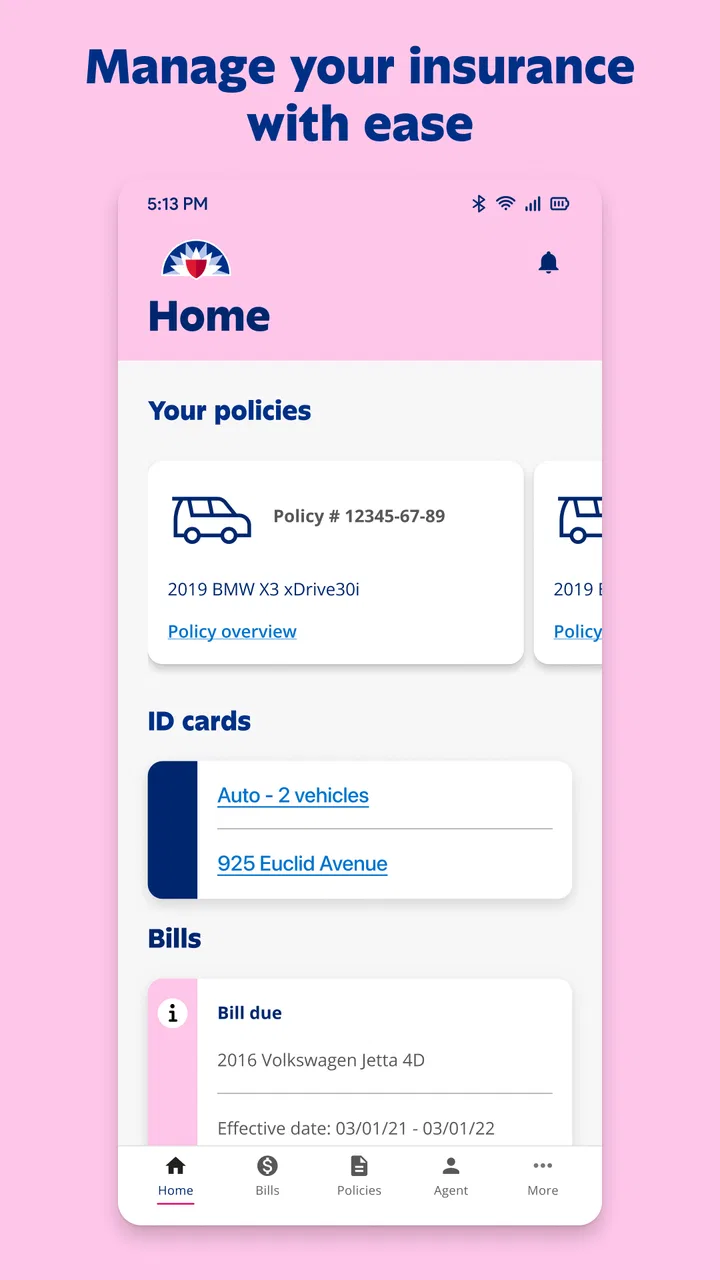
The main appeal is convenience. Instead of treating a policy as a folder of documents, the app gives you a mobile starting point for common requests. The available actions include making payments, accessing ID cards, reporting a claim, and getting a quote. That combination covers both existing customers and people who are still considering coverage.
For an existing customer, the most useful part is likely the ability to reach policy information when away from home. An insurance ID card can be needed at an awkward time, such as after changing vehicles, during a roadside conversation, or when someone asks for proof of coverage. Having a digital route to it is more practical than relying on a photograph of an old card.
For a potential customer, the quote path is a different kind of use. It lets the app serve as an entry point before a policy relationship exists. I like that distinction because it means the app is not limited to people who have already completed every account step, although the experience will naturally be more valuable once your Farmers information is connected.
My main expectation would be speed and access, not deep explanation. Insurance products can involve details that are difficult to summarize on a small screen. The app is best viewed as a convenient control panel for routine actions, while complicated coverage questions may still be better handled through direct support or a careful review of policy documents.
Who will get the most from it
This app makes the most sense for a Farmers customer who pays for coverage, keeps more than one policy, or wants a reliable way to reach insurance documents while traveling. It can also suit someone who dislikes carrying printed cards and wants a more current digital option for everyday access.
It is less suitable for someone comparing many insurers side by side and looking for a neutral marketplace. The quote function may help you begin with Farmers, but it is not a substitute for comparing terms, deductibles, exclusions, and service expectations across different providers. I would also skip it if you have no relationship with Farmers and only need a general finance organizer.
Families may find the app useful, but I would be careful about assuming that every household member should use the same login or device. Insurance access can involve personal account information, so I would set it up on a device I control and avoid treating the app like a public reference tool. The convenience is real, but it should be balanced with ordinary care around account access.
Setting it up without making the first step harder
After installing the app, I would begin with a simple goal rather than trying to explore every option immediately. Decide whether your first task is to view an ID card, make a payment, report a claim, or request a quote. That choice gives the setup a purpose and makes it easier to tell whether the app is ready for what you need.
If you are an existing customer, have the relevant account details available before starting. This is a small but useful preparation step: insurance apps are much easier to set up when you are not switching between the phone, a paper document, and an email inbox looking for information. I would also make sure the name and contact details used during setup match the information associated with the Farmers account.
New customers should approach the quote process with the same care they would use on a website. A quote is only as useful as the information entered. Vehicle details, driver information, address details, and coverage choices can affect the result, so I would not rush through the form simply because it appears on a phone.
Once access is established, I would spend a minute locating the payment, ID-card, claim, and quote areas. This is one of the most valuable setup habits because it prevents you from learning the navigation during an emergency. You do not need to memorize every screen; you only need to know where the four high-value actions begin.
I would also check that the digital ID card is easy to reach before I actually need it. If you have more than one vehicle or policy, pay attention to how the app distinguishes them. Confusing one vehicle’s document with another is a realistic risk in any insurance account, especially when several records look similar at a glance.
The first meaningful success: complete one small task
For most existing customers, I recommend making the first successful action something low-pressure, such as opening the ID-card area and confirming that the information looks correct. This gives you immediate practical value and helps you learn the account layout without making a payment or beginning a claim.
If a payment is due, the payment workflow may be the more meaningful test. I would review the selected policy and amount carefully before confirming anything. The app’s convenience should not encourage automatic tapping. A payment is a financial transaction, so the final review is where I would verify that I am acting on the intended account.
A useful habit is to take note of the route you followed, not just the result. If you reach the ID card through a policy screen, remember that relationship. If payment begins from a billing section, remember that instead. Insurance apps are often used months apart, and a small mental map can save time the next time you return.
Reporting a claim is a more serious first action. I would use the app when I am ready to provide accurate information, but I would not delay urgent safety steps while trying to navigate it. In a real incident, I would first make sure everyone is safe and handle any immediate emergency needs. The app can organize the insurance part; it should not replace common-sense priorities at the scene.
For someone seeking a quote, the first success is not simply reaching a price screen. I would consider the process successful when I understand what information was used and what the next step requires. That mindset helps prevent a quick estimate from being mistaken for a complete comparison of insurance value.
How I would use it in an ordinary stressful situation
Imagine discovering after a minor parking-lot incident that you need your insurance information. I would open Farmers Insurance, go directly to the policy or ID-card area, and select the relevant vehicle rather than scrolling through unrelated account details. If the situation requires a claim, I would then move to the reporting option once the immediate exchange of information and safety concerns were handled.
The advantage here is not that the app makes an accident pleasant; no app can do that. The advantage is that it reduces the number of separate places I need to search. I would not have to remember whether the card was saved in a photo folder, find an old email, or return home for a paper document.
Another realistic example is a payment deadline while traveling. I would use the app to reach the payment function, check the policy context, and complete the transaction if everything is correct. The important trade-off is that mobile convenience makes access easier, but it also makes it tempting to act quickly on a small screen. I would slow down for the final confirmation.
For a household with several vehicles, I would use the app as a reference point before leaving for a trip. I would identify which digital card belongs to the vehicle being driven and make sure I know how to open it. That preparation is more useful than waiting until someone asks for proof of insurance.
Where new users may become confused
The biggest source of confusion is likely the difference between an existing-customer task and a new-quote task. They may both appear within the same app, but they serve different purposes. A quote is part of exploring coverage, while a payment or ID card belongs to an established policy relationship. If you enter the wrong path, the app can feel less helpful even though you are simply in the wrong section.
Policy language can also make a straightforward screen feel complicated. Terms related to vehicles, drivers, billing, claims, and coverage are not interchangeable. I would read the labels carefully instead of assuming that a payment screen is showing every policy in the household or that an ID-card screen represents every possible document.
Another point to watch is the difference between reporting a claim and asking a general question. Starting a claim is a meaningful insurance action, not just a request for information. I would prepare a clear description of what happened and check the details before submitting. If I only wanted clarification about coverage, I would avoid beginning a claim by mistake.
Digital documents can create false confidence if they are not checked. I would look at the policy or vehicle information shown on the card before presenting it. This is especially important after a renewal, a vehicle change, or an update to the account. A document being easy to open does not automatically mean it is the right document for the current situation.
Finally, a mobile quote should not be judged only by how quickly it appears. The meaningful question is whether the coverage choices fit your needs and whether you understand the trade-offs. A lower-looking figure can be less useful if it comes with limits that do not suit your situation. The app can start the conversation, but careful comparison still belongs to the user.
Small habits that make the app more useful
Open the ID-card section before a trip, not after a problem occurs, and confirm that you are viewing the correct vehicle.
Before making a payment, pause at the final review and check the policy context and amount rather than relying on a quick tap.
For a claim, write down the basic sequence of events first so that the mobile form is completed consistently and calmly.
Use the quote workflow as a starting point for comparison, then examine coverage details instead of treating the first result as a final decision.
These habits are not flashy features, but they are where I see the practical value of the app. The strongest insurance tools are often the ones that help you avoid a small mistake when you are distracted, rushed, or away from your usual paperwork.
How it compares with the usual alternatives
Compared with using a mobile browser, Farmers Insurance feels more purpose-built for repeated access to the same insurer. A browser can be perfectly adequate for occasional account work, especially if you prefer not to install another app. The dedicated app becomes more worthwhile when you regularly need the ID-card, payment, or claim routes and want them gathered in one place.
Compared with keeping screenshots or paper cards, the app offers a more active account connection. A screenshot is quick, but it can become outdated and may not help with payments, claims, or quotes. Paper is dependable when stored safely, but it is easy to leave behind. The app’s advantage is breadth: it combines document access with account actions.
Compared with a general finance app, it is much narrower but also more relevant to Farmers customers. A budgeting app may show spending across accounts, yet it will not be the natural place to request a Farmers quote or report a Farmers claim. I would use both if I wanted broad financial organization alongside insurer-specific access.
Compared with speaking directly to an insurance representative, the app is faster for routine actions but less reassuring for unusual situations. A payment or ID-card request is a good fit for self-service. A complicated claim, uncertain coverage question, or major policy decision may benefit from human explanation. I see the app as a first line for convenience, not a universal replacement for personal assistance.
The trade-off is therefore clear. You gain a compact route to Farmers tasks, but you remain within the Farmers ecosystem. If your priority is comparing several insurers, managing unrelated financial products, or receiving detailed advice before acting, another channel will serve you better.
What I would do after the first successful action
Once I had opened the correct ID card or completed a payment, I would not stop at the first screen that worked. I would explore the other major routes while the account is calm: where to begin a claim, where to request a quote, and where policy information is displayed. This turns a one-time installation into preparation for the next real need.
I would also decide whether the app belongs in my regular routine. If I pay manually, having a mobile payment route may justify keeping it installed. If I rarely interact with my insurer and already have a dependable browser routine, the app may offer less benefit. The right choice depends on how often you need Farmers-specific access, not on the number of available buttons.
For people considering a new policy, my next step would be to use the quote process thoughtfully and then compare the coverage itself with alternatives. For existing customers, I would make sure I can distinguish policies and vehicles before an urgent moment arrives. In both cases, the app is most valuable when it supports a decision you already understand rather than encouraging a rushed one.
My overall impression is positive because Farmers Insurance concentrates on tasks that are genuinely useful on a phone. The free app has a clear role, a long history, broad adoption, and a strong average rating. Its limitations are mostly about scope and context: it is not a complete finance manager, and it cannot replace careful insurance judgment or human help for every situation.
I would recommend it to Farmers customers who want convenient access to payments, digital ID cards, claims, and quotes. I would be more cautious about recommending it to someone who only wants general financial tools or a neutral insurance comparison service. Installed with a specific purpose and used carefully, Farmers Insurance can make the most annoying insurance chores noticeably easier.
FAQs for Farmers Insurance Inc.
01What features does the Farmers Insurance app offer?
The Farmers Insurance app provides a comprehensive suite of features designed to make managing your insurance policies convenient. Users can view policy details, pay bills, file claims, and access insurance ID cards. Additionally, the app offers features like roadside assistance requests and the ability to contact your insurance agent directly.
02Is the Farmers Insurance app secure?
Yes, the Farmers Insurance app is equipped with robust security measures to protect your personal information. It uses encryption to safeguard data and requires secure login credentials. Regular updates are provided to address any security vulnerabilities, ensuring your sensitive information remains protected.
03Can I file a claim through the app?
Absolutely. Filing a claim is one of the core features of the Farmers Insurance app. The process is streamlined, allowing you to report incidents, provide necessary details, and upload photos directly through the app. You can also track the progress of your claim in real-time.
04Does the app offer support for multiple insurance policies?
Yes, the Farmers Insurance app supports multiple policies, making it easy for users to manage different types of insurance coverage. Whether you have auto, home, or life insurance, you can access and manage all your policies in one convenient place within the app.
05Is the Farmers Insurance app available for both Android and iOS?
The Farmers Insurance app is available for both Android and iOS devices. You can download it from the Google Play Store for Android users and the Apple App Store for iOS users. Regular updates are released to enhance functionality and introduce new features.
Pros
- User-friendly interface for easy navigation.
- Wide range of insurance options available.
- Quick claim processing for convenience.
- 24/7 customer support for assistance.
- Customizable coverage to fit individual needs.
Cons
- Limited discounts compared to competitors.
- App occasionally experiences slow loading.
- Requires frequent updates for bug fixes.
- Some features unavailable offline.
- Complex policy wording may confuse users.

Farmers Insurance Inc.
Gallery